MikroTik Hardening Guide: Complete Security Checklist
MikroTik routers power millions of networks worldwide because their flexibility and cost-effectiveness make them popular choices for enterprises, ISPs, and small businesses. The problem is that this popularity basically makes them prime targets for attackers.
What This Guide Covers
- User account and authentication hardening
- Management service security
- Firewall rule implementation
- Network layer protection
- Routing protocol security
- VPN hardening
- Logging and monitoring setup
- Advanced security measures
Target Audience
- Network engineers managing MikroTik infrastructure
- Systems administrators responsible for edge security
- Managed service providers (MSPs) deploying MikroTik devices
- Security professionals auditing network equipment
Why MikroTik Security Hardening Matters in 2024
Current Threat Landscape
- Shodan indexes over 2 million MikroTik devices with exposed services
- Automated scanning tools target default MikroTik ports continuously
- Cryptojacking campaigns specifically target RouterOS vulnerabilities
- Nation-state actors use compromised routers for traffic interception
Common Attack Vectors
| Attack Vector | Risk Level | Common Exploitation |
|---|---|---|
| Default credentials | Critical | Immediate full access |
| Exposed Winbox (8291) | High | Brute force, CVE exploitation |
| Open DNS resolver | High | DNS amplification attacks |
| Unpatched RouterOS | Critical | Known CVE exploitation |
| Exposed API | High | Automated attacks |
Consequences of Compromise
- Lateral movement: Attackers pivot to internal network resources
- Traffic interception: Sensitive data capture and manipulation
- Botnet recruitment: Your device attacks other networks
- Cryptojacking: CPU resources used for cryptocurrency mining
- Regulatory violations: PCI-DSS, HIPAA, and GDPR compliance failures
Pre-Hardening Preparation: Baseline Assessment
Document Your Current Configuration
Create backups before making changes. Store backups off-device in a secure location.
Export Configuration (Text Format)
/export file=config-backup-pre-hardeningCreate Binary Backup
/system backup save name=backup-pre-hardening encryption=aes-sha256 password=YourSecurePasswordInventory Current State
# List all enabled services
/ip service print

# List all user accounts
/user print

# List all active connections
/ip firewall connection print

# Check current RouterOS version
/system resource print
Update RouterOS and Firmware
Running outdated software exposes your device to known vulnerabilities. Update before hardening.
Check Current Version
/system resource print
/system routerboard print
Update RouterOS
# Check for updates
/system package update check-for-updates

# Download and install
/system package update install
Update Firmware
# Check firmware status
/system routerboard print

# Upgrade firmware to match RouterOS
/system routerboard upgrade

# Reboot to apply
/system reboot
Important: Test updates in a lab environment before applying to production devices.
User Account and Authentication Security Checklist
Disable or Secure the Default Admin Account
The default “admin” username with blank password is the most exploited vulnerability. Change this immediately.
1: Create New Administrator Account
/user add name=netadmin password="YourComplexPassword123!@#" group=full2: Test New Account Access
Log out and log in with the new account. Verify full access works correctly.
3: Disable Default Admin
/user disable adminAlternative: Remove Default Admin
/user remove adminPassword Requirements
- Minimum 16 characters
- Mix of uppercase, lowercase, numbers, and symbols
- No dictionary words
- Unique per device (do not reuse passwords)
Implement Role-Based Access Control (RBAC)
Create user groups with minimal required permissions. Avoid granting full access to all users.
1: Create Read-Only Monitoring Group
/user group add name=monitoring policy=read,winbox,web,!local,!telnet,!ssh,!ftp,!reboot,!write,!policy,!test,!password,!sniff,!sensitive,!api,!romon,!rest-api2: Create Limited Operator Group
/user group add name=operator policy=read,write,winbox,web,!local,!telnet,ssh,!ftp,!reboot,!policy,test,password,!sniff,!sensitive,!api,!romon,!rest-api3: Create Users with Appropriate Groups
# Monitoring user
/user add name=monitor-user password="MonitorPass123!@#" group=monitoring

# Operator user
/user add name=operator-user password="OperatorPass123!@#" group=operator
Configure SSH Key Authentication
SSH keys provide stronger security than passwords. Implement key-based authentication for administrative access.
1: Generate SSH Key Pair (On Your Workstation)
# Linux/macOS
ssh-keygen -t rsa -b 4096 -f ~/.ssh/mikrotik_admin

# Windows (PowerShell)
ssh-keygen -t rsa -b 4096 -f $env:USERPROFILE\.ssh\mikrotik_admin
2: Upload Public Key to MikroTik
# Copy public key to router via SCP
scp ~/.ssh/mikrotik_admin.pub netadmin@192.168.88.1:
3: Import Public Key for User
/user ssh-keys import public-key-file=mikrotik_admin.pub user=netadmin4: Verify Key Installation
/user ssh-keys printSecuring MikroTik Management Services
Disable Unnecessary Services
Each enabled service increases attack surface. Disable everything you do not actively use.
View Current Services
/ip service printDefault Service Risk Assessment
| Service | Default Port | Risk Level | Recommendation |
|---|---|---|---|
| Telnet | 23 | Critical | Disable |
| FTP | 21 | High | Disable |
| WWW | 80 | High | Disable or restrict |
| WWW-SSL | 443 | Medium | Restrict if needed |
| SSH | 22 | Medium | Restrict and harden |
| Winbox | 8291 | Medium | Restrict |
| API | 8728 | High | Disable or use API-SSL |
| API-SSL | 8729 | Medium | Restrict if needed |
Disable High-Risk Services
/ip service disable telnet,ftp,www,apiRestrict Management Access by IP Address
Limit service access to trusted management networks. This single step prevents most unauthorized access attempts.
Define Management Network
# Create address list for management access
/ip firewall address-list add list=management-networks address=192.168.88.0/24 comment="Management VLAN"
/ip firewall address-list add list=management-networks address=10.0.0.5/32 comment="Admin workstation"
Restrict Services to Management Networks
/ip service set ssh address=192.168.88.0/24,10.0.0.5/32
/ip service set winbox address=192.168.88.0/24,10.0.0.5/32
/ip service set www-ssl address=192.168.88.0/24,10.0.0.5/32
Change Default Service Ports
Port changes add an additional layer of obscurity. Automated scanners target default ports first.
Change Service Ports
/ip service set ssh port=2222
/ip service set winbox port=18291
/ip service set www-ssl port=8443
Note: Document all port changes. Update your documentation and monitoring systems accordingly.
Secure Winbox Configuration
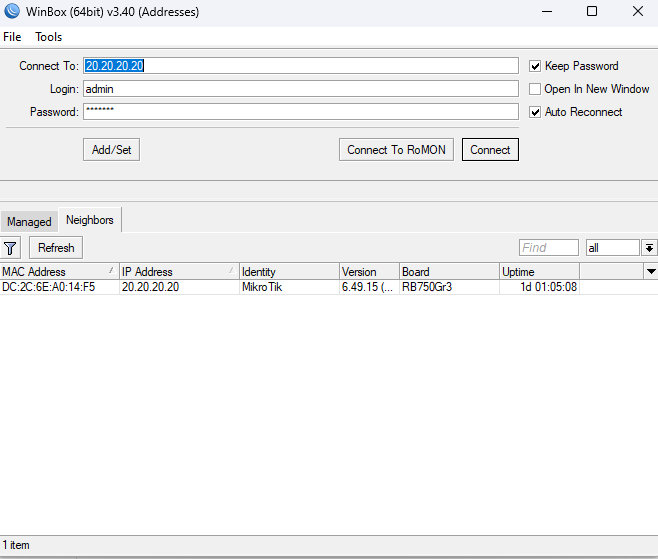
Disable MAC Address Access
MAC Winbox allows access without IP configuration. Disable on production networks.
# Disable MAC Winbox on all interfaces
/tool mac-server mac-winbox set allowed-interface-list=none
Enable Secure Mode
RouterOS v6.43+ supports TLS for Winbox connections.
# Force secure connections only
/ip service set winbox tls-version=only-1.2
Harden SSH Access
Configure Strong Cryptography
/ip ssh set strong-crypto=yesSet Host Key Size
/ip ssh set host-key-size=4096
/ip ssh regenerate-host-key
Limit Concurrent Connections
/ip ssh set forwarding-enabled=no always-allow-password-login=noSecure API Access
If API access is required, use API-SSL exclusively with proper restrictions.
Disable Unencrypted API
/ip service disable apiConfigure API-SSL with Restrictions
/ip service set api-ssl address=192.168.88.0/24 certificate=server-cert tls-version=only-1.2MikroTik Firewall Rules for Maximum Protection
Firewall Architecture Overview
RouterOS processes traffic through chains in this order:
- RAW: Prerouting and output (before connection tracking)
- Filter: Input, forward, and output (main firewall)
- NAT: Srcnat and dstnat (address translation)
- Mangle: All chains (packet marking and modification)
Input Chain: Protecting the Router
The input chain controls traffic destined for the router itself. Implement a deny-by-default policy.
Create Management Address List
/ip firewall address-list add list=allowed-management address=192.168.88.0/24 comment="Management VLAN"
/ip firewall address-list add list=allowed-management address=10.10.10.0/24 comment="IT Department"
Complete Input Chain Ruleset
# Accept established and related connections
/ip firewall filter add chain=input action=accept connection-state=established,related comment="Accept established/related"

# Drop invalid connections
/ip firewall filter add chain=input action=drop connection-state=invalid comment="Drop invalid"

# Accept ICMP with rate limiting
/ip firewall filter add chain=input action=accept protocol=icmp icmp-options=8:0 limit=5,10:packet comment="Accept ping with limit"

# Accept management from trusted networks
/ip firewall filter add chain=input action=accept src-address-list=allowed-management comment="Accept management access"

# Accept DNS from internal networks (if router is DNS server)
/ip firewall filter add chain=input action=accept protocol=udp dst-port=53 in-interface=bridge-lan comment="Accept internal DNS"

# Accept DHCP from internal interfaces
/ip firewall filter add chain=input action=accept protocol=udp dst-port=67 in-interface=bridge-lan comment="Accept DHCP"

# Drop everything else with logging
/ip firewall filter add chain=input action=log log-prefix="INPUT-DROP: " comment="Log dropped input"
/ip firewall filter add chain=input action=drop comment="Drop all other input"
Forward Chain: Controlling Traffic Flow
Stateful Packet Inspection Setup
# Accept established and related connections
/ip firewall filter add chain=forward action=accept connection-state=established,related comment="Accept established/related"

# Drop invalid connections
/ip firewall filter add chain=forward action=drop connection-state=invalid comment="Drop invalid"

# Accept traffic from LAN to WAN
/ip firewall filter add chain=forward action=accept in-interface=bridge-lan out-interface=ether1-wan comment="LAN to WAN"

# Drop all other forwarded traffic
/ip firewall filter add chain=forward action=drop comment="Drop all other forward"
Implement Anti-Spoofing Rules
# Create bogon address list
/ip firewall address-list add list=bogons address=0.0.0.0/8 comment="Self-identification"
/ip firewall address-list add list=bogons address=10.0.0.0/8 comment="Private RFC1918"
/ip firewall address-list add list=bogons address=100.64.0.0/10 comment="Carrier-grade NAT"
/ip firewall address-list add list=bogons address=127.0.0.0/8 comment="Loopback"
/ip firewall address-list add list=bogons address=169.254.0.0/16 comment="Link local"
/ip firewall address-list add list=bogons address=172.16.0.0/12 comment="Private RFC1918"
/ip firewall address-list add list=bogons address=192.0.0.0/24 comment="IETF Protocol"
/ip firewall address-list add list=bogons address=192.0.2.0/24 comment="Documentation TEST-NET-1"
/ip firewall address-list add list=bogons address=192.168.0.0/16 comment="Private RFC1918"
/ip firewall address-list add list=bogons address=198.18.0.0/15 comment="Benchmarking"
/ip firewall address-list add list=bogons address=198.51.100.0/24 comment="Documentation TEST-NET-2"
/ip firewall address-list add list=bogons address=203.0.113.0/24 comment="Documentation TEST-NET-3"
/ip firewall address-list add list=bogons address=224.0.0.0/4 comment="Multicast"
/ip firewall address-list add list=bogons address=240.0.0.0/4 comment="Reserved"

# Drop bogons on WAN interface
/ip firewall filter add chain=forward action=drop in-interface=ether1-wan src-address-list=bogons comment="Drop bogons from WAN" place-before=0
RAW Table: Early Drop for DDoS Mitigation
RAW rules process before connection tracking. Use for high-volume attack mitigation.
Drop Bogons in RAW Prerouting
/ip firewall raw add chain=prerouting action=drop in-interface=ether1-wan src-address-list=bogons comment="RAW: Drop bogons"Connection Limit Protection
# Limit new connections per source IP
/ip firewall raw add chain=prerouting action=drop protocol=tcp tcp-flags=syn connection-limit=100,32 in-interface=ether1-wan comment="RAW: Connection limit per IP"
Protect Against Port Scanning
Port Scan Detection and Blocking
# Detect and block port scanners
/ip firewall filter add chain=input action=add-src-to-address-list protocol=tcp psd=21,3s,3,1 address-list=port-scanners address-list-timeout=1w comment="Detect port scanners"
/ip firewall filter add chain=input action=drop src-address-list=port-scanners comment="Drop port scanners"
Brute Force Protection
SSH Brute Force Prevention
# Stage 1: Add to list on first connection attempt
/ip firewall filter add chain=input action=add-src-to-address-list protocol=tcp dst-port=22 address-list=ssh-stage1 address-list-timeout=1m connection-state=new

# Stage 2: Add to list on second connection within timeout
/ip firewall filter add chain=input action=add-src-to-address-list protocol=tcp dst-port=22 src-address-list=ssh-stage1 address-list=ssh-stage2 address-list-timeout=1m connection-state=new

# Stage 3: Add to blacklist on third connection within timeout
/ip firewall filter add chain=input action=add-src-to-address-list protocol=tcp dst-port=22 src-address-list=ssh-stage2 address-list=ssh-blacklist address-list-timeout=1w connection-state=new

# Drop blacklisted IPs
/ip firewall filter add chain=input action=drop src-address-list=ssh-blacklist comment="Drop SSH brute force"
Winbox Brute Force Prevention
# Same pattern for Winbox port
/ip firewall filter add chain=input action=add-src-to-address-list protocol=tcp dst-port=8291 address-list=winbox-stage1 address-list-timeout=1m connection-state=new
/ip firewall filter add chain=input action=add-src-to-address-list protocol=tcp dst-port=8291 src-address-list=winbox-stage1 address-list=winbox-stage2 address-list-timeout=1m connection-state=new
/ip firewall filter add chain=input action=add-src-to-address-list protocol=tcp dst-port=8291 src-address-list=winbox-stage2 address-list=winbox-blacklist address-list-timeout=1w connection-state=new
/ip firewall filter add chain=input action=drop src-address-list=winbox-blacklist comment="Drop Winbox brute force"
Network Layer Security Hardening
Disable Unused IP Services
Bandwidth Server
/tool bandwidth-server set enabled=noDNS Cache (If Not Used)
/ip dns set allow-remote-requests=noUPnP (Universal Plug and Play)
UPnP allows automatic port forwarding. Disable for security.
/ip upnp set enabled=noSOCKS Proxy
/ip socks set enabled=noWeb Proxy
/ip proxy set enabled=noCloud Service (If Not Used)
/ip cloud set ddns-enabled=no update-time=noMAC Server and Discovery Protocol Security
1: Disable MAC Telnet Server
/tool mac-server set allowed-interface-list=none2: Disable MAC Winbox Server
/tool mac-server mac-winbox set allowed-interface-list=none3: Disable MAC Ping Server
/tool mac-server ping set enabled=noRestrict Neighbor Discovery
MNDP (MikroTik Neighbor Discovery Protocol) reveals device information. Disable on untrusted interfaces.
# Create list of internal interfaces only
/interface list add name=discovery-allowed
/interface list member add list=discovery-allowed interface=bridge-lan

# Restrict discovery to internal interfaces
/ip neighbor discovery-settings set discover-interface-list=discovery-allowed
Secure DHCP Configuration
Enable DHCP Snooping
/ip dhcp-server set [find] add-arp=yesLimit DHCP Leases
/ip pool set [find name=dhcp-pool] ranges=192.168.88.100-192.168.88.200Configure DHCP Alert
/ip dhcp-server alert add interface=bridge-lanARP Security Measures
Enable ARP Reply-Only Mode
Prevents ARP spoofing by only responding to known MAC addresses.
/interface ethernet set [find] arp=reply-onlyCreate Static ARP Entries for Critical Devices
/ip arp add address=192.168.88.1 mac-address=AA:BB:CC:DD:EE:FF interface=bridge-lanSecuring Routing Protocols
OSPF Authentication
Configure authentication to prevent unauthorized route injection.
RouterOS v7 OSPF Authentication
# Create authentication key
/routing ospf interface-template add interfaces=ether2 area=backbone auth=md5 auth-id=1 auth-key="YourSecureOSPFKey123"
RouterOS v6 OSPF Authentication
/routing ospf interface set [find] authentication=md5 authentication-key="YourSecureOSPFKey123"BGP Security Best Practices
Enable TCP MD5 Authentication
# RouterOS v7
/routing bgp connection add name=upstream remote.address=203.0.113.1 remote.as=65001 local.address=203.0.113.2 tcp-md5-key="YourSecureBGPKey123"
Configure TTL Security (GTSM)
# RouterOS v7
/routing bgp connection set [find name=upstream] multihop=no ttl=1
Set Maximum Prefix Limits
# RouterOS v7
/routing bgp connection set [find name=upstream] input.limit-process-routes-ipv4=10000
Disable Unused Routing Features
# Check for running routing protocols
/routing ospf instance print
/routing bgp instance print
/routing rip instance print

# Disable unused protocols
/routing rip instance set [find] disabled=yes
VPN and Remote Access Hardening
IPsec Configuration Security
Create Strong Phase 1 Profile
/ip ipsec profile add name=secure-profile hash-algorithm=sha256 enc-algorithm=aes-256 dh-group=modp2048,modp3072 lifetime=1d proposal-check=strictCreate Strong Phase 2 Proposal
/ip ipsec proposal add name=secure-proposal auth-algorithms=sha256,sha512 enc-algorithms=aes-256-cbc,aes-256-gcm pfs-group=modp2048 lifetime=8hDisable Weak Proposals
/ip ipsec proposal remove [find name=default]
/ip ipsec profile remove [find name=default]
IPsec Peer Configuration
/ip ipsec peer add address=203.0.113.1/32 profile=secure-profile exchange-mode=ike2WireGuard Security (RouterOS v7)
Create WireGuard Interface
/interface wireguard add name=wg0 listen-port=51820 mtu=1420Configure Peer with Allowed IPs Restriction
/interface wireguard peers add interface=wg0 public-key="PeerPublicKeyHere=" allowed-address=10.10.10.2/32 endpoint-address=203.0.113.1 endpoint-port=51820Important: Restrict allowed-address to specific IPs needed. Avoid using 0.0.0.0/0 unless necessary.
Disable Insecure VPN Protocols
Disable PPTP
PPTP uses broken cryptography. Do not use if you don’t have to.
/interface pptp-server server set enabled=noDisable L2TP Without IPsec
/interface l2tp-server server set enabled=noIf L2TP is Required, Force IPsec
/interface l2tp-server server set use-ipsec=required ipsec-secret="YourIPsecSecret"Logging and Monitoring for Threat Detection
Configure Comprehensive Logging
Define Log Actions
# Memory logging
/system logging action set [find name=memory] memory-lines=10000

# Remote syslog server
/system logging action add name=remote-syslog target=remote remote=192.168.88.10 remote-port=514 bsd-syslog=yes
Configure Log Topics
# Log security-relevant events to remote syslog
/system logging add topics=critical action=remote-syslog
/system logging add topics=error action=remote-syslog
/system logging add topics=warning action=remote-syslog
/system logging add topics=system action=remote-syslog
/system logging add topics=firewall action=remote-syslog
/system logging add topics=ipsec action=remote-syslog
/system logging add topics=ssh action=remote-syslog
SNMP Hardening
1: Disable SNMP (If Not Needed)
/snmp set enabled=no2: Configure SNMPv3 (Recommended)
/snmp set enabled=yes trap-version=3
/snmp community remove [find]
/snmp community add name=secure-snmpv3 security=private authentication-protocol=SHA1 authentication-password="YourAuthPassword123" encryption-protocol=AES encryption-password="YourEncryptPassword123" read-access=yes write-access=no addresses=192.168.88.0/24
3: Harden SNMPv2c (Legacy Systems)
/snmp community remove [find name=public]
/snmp community add name=randomstring123xyz security=authorized read-access=yes write-access=no addresses=192.168.88.10/32
Configure Email Alerts
Set Up Email Server
/tool e-mail set address=smtp.example.com port=587 start-tls=yes user=alerts@example.com password="YourEmailPassword"Create Alert Script
/system script add name=security-alert source={
    :local message "Security alert from router: $[/system identity get name]"
    /tool e-mail send to="admin@example.com" subject="MikroTik Security Alert" body=$message
}
Schedule Log Monitoring
/system scheduler add name=check-security interval=5m on-event={
    :if ([:len [/log find message~"login failure"]] > 10) do={
        /system script run security-alert
    }
}
Traffic Flow Configuration
Enable Traffic Flow for Analysis
/ip traffic-flow set enabled=yes interfaces=ether1-wan cache-entries=256k active-flow-timeout=1m inactive-flow-timeout=15s
/ip traffic-flow target add dst-address=192.168.88.10 port=2055 version=9
Advanced MikroTik Security Measures
Certificate Management
Generate CA Certificate
/certificate add name=local-ca common-name=LocalCA key-usage=key-cert-sign,crl-sign days-valid=3650
/certificate sign local-ca ca-crl-host=192.168.88.1
Generate Server Certificate
/certificate add name=server-cert common-name=router.example.com subject-alt-name=DNS:router.example.com,IP:192.168.88.1 key-usage=tls-server days-valid=365
/certificate sign server-cert ca=local-ca
Apply Certificate to Services
/ip service set www-ssl certificate=server-cert
/ip service set api-ssl certificate=server-cert
Secure NTP Configuration
Configure NTP Client
/system ntp client set enabled=yes
/system ntp client servers add address=time.cloudflare.com
/system ntp client servers add address=pool.ntp.org
Disable NTP Server Mode
/system ntp server set enabled=noDNS Security
Configure DoH (DNS over HTTPS) – RouterOS v7
/ip dns set use-doh-server="https://cloudflare-dns.com/dns-query" verify-doh-cert=yesPrevent Open DNS Resolver
# Only allow DNS from internal networks
/ip dns set allow-remote-requests=yes
/ip firewall filter add chain=input action=accept protocol=udp dst-port=53 src-address=192.168.88.0/24 comment="Allow internal DNS"
/ip firewall filter add chain=input action=drop protocol=udp dst-port=53 comment="Block external DNS"
Disable Container Feature (If Not Used)
RouterOS v7 includes container support. Disable if not required.
/system/device-mode/update container=noPort Knocking Implementation
Three-Stage Port Knocking for SSH
# Stage 1: Knock on port 1111
/ip firewall filter add chain=input action=add-src-to-address-list protocol=tcp dst-port=1111 address-list=knock-stage1 address-list-timeout=10s

# Stage 2: Knock on port 2222 (within timeout)
/ip firewall filter add chain=input action=add-src-to-address-list protocol=tcp dst-port=2222 src-address-list=knock-stage1 address-list=knock-stage2 address-list-timeout=10s

# Stage 3: Knock on port 3333 (within timeout)
/ip firewall filter add chain=input action=add-src-to-address-list protocol=tcp dst-port=3333 src-address-list=knock-stage2 address-list=knock-authorized address-list-timeout=5m

# Allow SSH only from authorized knockers
/ip firewall filter add chain=input action=accept protocol=tcp dst-port=22 src-address-list=knock-authorized
Physical and Environmental Security
Console Port Security
- Disable serial console if not needed
- Use cable management to secure console access
- Place device in locked network cabinet
Disable Unused Physical Ports
# Disable unused Ethernet ports
/interface ethernet set ether3 disabled=yes
/interface ethernet set ether4 disabled=yes
/interface ethernet set ether5 disabled=yes
LCD Security (Devices with LCD)
/lcd set enabled=noReset Button Protection
/system routerboard settings set protected-routerboot=enabled
/system routerboard settings set reformat-hold-button=20s
Warning: Enabling protected-routerboot requires button hold during boot to access settings. Document the hold time for recovery.
MikroTik Security Hardening Checklist Summary
Immediate Actions (Complete Today)
| Task | Priority | Completed |
|---|---|---|
| Change default admin credentials | Critical | ☐ |
| Update RouterOS to latest stable version | Critical | ☐ |
| Update firmware/routerboard | Critical | ☐ |
| Disable telnet service | Critical | ☐ |
| Disable FTP service | High | ☐ |
| Disable unencrypted API | High | ☐ |
| Restrict SSH/Winbox by IP address | High | ☐ |
| Disable MAC Telnet on all interfaces | High | ☐ |
| Disable MAC Winbox on WAN interface | High | ☐ |
| Implement basic input chain firewall rules | High | ☐ |
Short-Term Actions (Complete This Week)
| Task | Priority | Completed |
|---|---|---|
| Implement RBAC with minimal permissions | High | ☐ |
| Configure remote syslog | High | ☐ |
| Disable or restrict neighbor discovery | Medium | ☐ |
| Configure SSH key authentication | Medium | ☐ |
| Harden VPN configurations | High | ☐ |
| Implement complete firewall ruleset | High | ☐ |
| Add bogon address filtering | Medium | ☐ |
| Configure brute force protection | Medium | ☐ |
| Disable unused IP services | Medium | ☐ |
| Document all configuration changes | High | ☐ |
Ongoing Maintenance Tasks
| Task | Frequency | Completed |
|---|---|---|
| Check for RouterOS updates | Weekly | ☐ |
| Review security logs | Daily | ☐ |
| Verify backup integrity | Weekly | ☐ |
| Audit user accounts | Monthly | ☐ |
| Review firewall rules | Monthly | ☐ |
| Rotate passwords | Quarterly | ☐ |
| Full security audit | Annually | ☐ |
Common MikroTik Misconfigurations to Avoid
Critical Security Mistakes
| Misconfiguration | Risk | Detection Command |
|---|---|---|
| Default admin with no password | Critical | /user print where name=admin |
| Open DNS resolver | High | /ip dns print |
| Exposed Winbox on WAN | High | /ip service print where name=winbox |
| No firewall rules | Critical | /ip firewall filter print count-only |
| PPTP enabled | High | /interface pptp-server server print |
| Telnet enabled | Critical | /ip service print where name=telnet |
| UPnP enabled | High | /ip upnp print |
| Default SNMP community “public” | Medium | /snmp community print |
Security Audit Script
Run this script to check for common misconfigurations:
:put "=== MikroTik Security Audit ==="
:put ""
:put "--- Checking User Accounts ---"
/user print where name=admin
:put ""
:put "--- Checking Services ---"
/ip service print
:put ""
:put "--- Checking DNS Settings ---"
/ip dns print
:put ""
:put "--- Checking Firewall Rules Count ---"
:put ("Input chain rules: " . [:len [/ip firewall filter find chain=input]])
:put ("Forward chain rules: " . [:len [/ip firewall filter find chain=forward]])
:put ""
:put "--- Checking MAC Server Settings ---"
/tool mac-server print
/tool mac-server mac-winbox print
:put ""
:put "--- Checking Neighbor Discovery ---"
/ip neighbor discovery-settings print
:put ""
:put "--- Checking PPTP Server ---"
/interface pptp-server server print
:put ""
:put "--- Checking UPnP ---"
/ip upnp print
:put ""
:put "--- Checking SNMP ---"
/snmp print
/snmp community print
:put ""
:put "=== Audit Complete ==="
Verification and Testing Your Hardened Configuration
Internal Testing
Verify Service Restrictions
# From management network - should succeed
ssh admin@192.168.88.1 -p 2222

# From non-management network - should fail
ssh admin@192.168.88.1 -p 2222
Test Firewall Rules
# View firewall rule hit counters
/ip firewall filter print stats

# View logged packets
/log print where topics~"firewall"
External Testing
Port Scanning with Nmap
# Basic port scan from external network
nmap -sS -p 1-65535 your-public-ip

# Service detection scan
nmap -sV -p 22,23,80,443,8291,8728,8729 your-public-ip
Check for Public Exposure
- Search Shodan.io for your public IP address
- Search Censys.io for exposed services
- Use MikroTik’s vulnerability scanner at mikrotik.com
Verify Logging Works
# Generate test log entry
/log info message="Security audit test"

# Verify on remote syslog server
# Check that message appears in syslog
Test Brute Force Protection
# Attempt multiple failed logins
# Verify IP appears in blacklist
/ip firewall address-list print where list~"blacklist"
Maintaining Security Long-Term
Stay Informed
- Subscribe to MikroTik security announcements at blog.mikrotik.com
- Monitor CVE databases for RouterOS vulnerabilities
- Join MikroTik forum security discussions
- Follow r/mikrotik on Reddit for community alerts
Backup Strategy
Automated Backup Script
/system script add name=auto-backup source={
    :local date [/system clock get date]
    :local name ("backup-" . $date)
    /export file=$name
    /system backup save name=$name encryption=aes-sha256 password="YourBackupPassword"
    # Optional: Send to remote server via FTP/SFTP
}

/system scheduler add name=daily-backup interval=1d on-event="/system script run auto-backup"
Change Management
- Document all configuration changes with date and reason
- Test changes in lab environment before production
- Maintain rollback procedures for all changes
- Use version control for exported configurations
Security Update Process
- Subscribe to MikroTik release notifications
- Test new versions in lab within 48 hours of release
- Schedule production updates within 7 days for security patches
- Document update procedure and rollback steps
- Verify functionality after each update
Conclusion
MikroTik devices provide powerful networking capabilities. This power requires responsible security configuration. Default settings prioritize ease of setup over security.
Key Takeaways
- Start with immediate actions: change credentials, update software, disable unused services
- Implement defense in depth with firewall rules, service restrictions, and monitoring
- Security requires ongoing maintenance, not one-time configuration
- Regular audits catch configuration drift and new vulnerabilities
Quick Wins for Today
# Run these commands now
/user add name=newadmin password="ComplexPassword123!@#" group=full
/user disable admin
/ip service disable telnet,ftp,www,api
/ip service set ssh address=YOUR.MANAGEMENT.SUBNET/24
/ip service set winbox address=YOUR.MANAGEMENT.SUBNET/24
/tool mac-server set allowed-interface-list=none
/tool mac-server mac-winbox set allowed-interface-list=none
/system package update check-for-updates
Security is a continuous process. Implement these hardening measures, verify their effectiveness, and maintain them over time. Your network’s security depends on consistent attention to these fundamentals.
Additional Resources
Official Documentation
Training and Certification
- MTCNA (MikroTik Certified Network Associate)
- MTCRE (MikroTik Certified Routing Engineer)
- MTCSE (MikroTik Certified Security Engineer)
Community Resources
Check our list of MikroTik guides